3D Modeling for AR
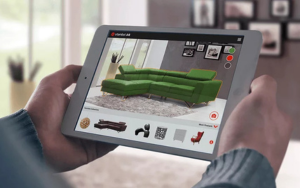
3D modeling for augmented reality (AR) involves creating detailed and optimized digital objects that can be seamlessly integrated into real-world environments. Since AR applications often run on mobile devices with limited processing power, 3D models must be carefully designed to balance visual quality with performance efficiency. This includes using low-polygon meshes, efficient texturing, and proper use of materials and lighting to ensure realistic appearance without taxing device resources. Models for AR also need to be scale-accurate and compatible with AR platforms and engines like Unity or Unreal Engine. Additionally, 3D assets in AR must support real-time interaction and respond naturally to user inputs and environmental changes. Mastering 3D modeling techniques specifically for AR helps developers deliver immersive and believable experiences that enhance the user’s perception of the digital-physical blend.
3D modeling for augmented reality (AR) involves creating detailed and optimized digital objects that can be seamlessly integrated into real-world environments. Since AR applications often run on mobile devices with limited processing power, 3D models must be carefully designed to balance visual quality with performance efficiency. This includes using low-polygon meshes, efficient texturing, and proper use of materials and lighting to ensure realistic appearance without taxing device resources. Models for AR also need to be scale-accurate and compatible with AR platforms and engines like Unity or Unreal Engine. Additionally, 3D assets in AR must support real-time interaction and respond naturally to user inputs and environmental changes. Mastering 3D modeling techniques specifically for AR helps developers deliver immersive and believable experiences that enhance the user’s perception of the digital-physical blend.
-
-
-
1. Introduction to 3D Modeling for AR
-
Importance of optimized 3D models in AR applications
-
Differences between 3D modeling for AR and traditional 3D modeling
2. Tools and Software for 3D Modeling
-
Popular 3D modeling tools: Blender, Maya, 3ds Max, ZBrush
-
Export formats compatible with AR platforms (FBX, OBJ, glTF)
3. Low-Polygon Modeling Techniques
-
Creating efficient meshes for mobile performance
-
Reducing polygon count without sacrificing visual quality
4. Texturing and UV Mapping
-
Applying textures that optimize memory and rendering
-
Techniques for efficient UV unwrapping and texture atlases
5. Materials and Shaders for AR
-
Using PBR (Physically Based Rendering) materials
-
Lightweight shaders suitable for real-time rendering in AR
6. Scale and Measurement Accuracy
-
Ensuring models are correctly scaled for real-world integration
-
Units and measurement standards in AR modeling
7. Lighting and Shadows
-
Preparing models for dynamic lighting environments
-
Techniques for baked and real-time shadows in AR
8. Rigging and Animation for AR
-
Basics of rigging 3D models for interaction and animation
-
Optimizing animations for smooth AR performance
9. Exporting and Importing Models into AR Engines
-
Preparing assets for Unity, Unreal Engine, and other AR platforms
-
Troubleshooting common import issues
10. Performance Optimization
-
Balancing detail and performance on mobile devices
-
Using LOD (Level of Detail) models for better efficiency
-
-
-
Why is low-polygon modeling important for AR? Answer:
Low-polygon models reduce the processing load on mobile devices, ensuring smooth performance and longer battery life in AR applications.
Which 3D file formats are best for AR development? Answer:
Common formats include FBX, OBJ, and glTF, with glTF gaining popularity for its efficiency and compatibility with many AR platforms.
Kerala
Thiruvalla, Pandalam, Adoor, Pathanamthitta, Kayamkulam, Kottayam, Marthandam, Neyyattinkkara, Nedumangad, Thiruvananthapuram City, Kilimanoor, Karikode, Kollam City, Karunagapally, Punalur, Anchal, Kuttikkanam, Elappara, Kalamassery, Kaloor, Angamali, Thrissur, Palakkad, Manjeri, Valanchery, Perinthalmanna, Calicut (Kozhikode), Perumbavoor, Vyttilla, Alappuzha, Harippad.
Tamil Nadu
Velachery, Anna Nagar, Thiruvattiyoor, Neyveli, Aranthangi, Pudukottai, Nagapattinam, Karaikal, Ariyalur, Mulumichampatti, Saravanampatti, Gandhipuram, Kumbakonam, Mayiladuthurai, Vaniyambadi, Vellore, Tirupattur (Vellore), Kancheepuram, Thiruvannamalai, Hosur, Hosur East.
Karnataka
Bangalore Electronic City, Mysore Kuvempunagar, Mysore City.
Andhra Pradesh
Panruti, Dilsukhnagar, Chittoor, West Godavari.
Maharashtra
Panvel, Dombivli, Dombivli East, Thane, Kalyan, Akurdi, Chinchwad, Nigdi, Karvenagar, Revet, Kothrud.
West Bengal
Kolkata, Durgapur.
Rajasthan
Sikar, Kota, Jhalawar.
Jharkhand
Ranchi.
Uttar Pradesh
Allahabad, Lucknow, Rambagh.
3D modeling for augmented reality (AR) involves creating detailed and optimized digital objects that can be seamlessly integrated into real-world environments. Since AR applications often run on mobile devices with limited processing power, 3D models must be carefully designed to balance visual quality with performance efficiency. This includes using low-polygon meshes, efficient texturing, and proper use of materials and lighting to ensure realistic appearance without taxing device resources. Models for AR also need to be scale-accurate and compatible with AR platforms and engines like Unity or Unreal Engine. Additionally, 3D assets in AR must support real-time interaction and respond naturally to user inputs and environmental changes. Mastering 3D modeling techniques specifically for AR helps developers deliver immersive and believable experiences that enhance the user’s perception of the digital-physical blend.
-
-
-
1. Introduction to 3D Modeling for AR
-
Importance of optimized 3D models in AR applications
-
Differences between 3D modeling for AR and traditional 3D modeling
2. Tools and Software for 3D Modeling
-
Popular 3D modeling tools: Blender, Maya, 3ds Max, ZBrush
-
Export formats compatible with AR platforms (FBX, OBJ, glTF)
3. Low-Polygon Modeling Techniques
-
Creating efficient meshes for mobile performance
-
Reducing polygon count without sacrificing visual quality
4. Texturing and UV Mapping
-
Applying textures that optimize memory and rendering
-
Techniques for efficient UV unwrapping and texture atlases
5. Materials and Shaders for AR
-
Using PBR (Physically Based Rendering) materials
-
Lightweight shaders suitable for real-time rendering in AR
6. Scale and Measurement Accuracy
-
Ensuring models are correctly scaled for real-world integration
-
Units and measurement standards in AR modeling
7. Lighting and Shadows
-
Preparing models for dynamic lighting environments
-
Techniques for baked and real-time shadows in AR
8. Rigging and Animation for AR
-
Basics of rigging 3D models for interaction and animation
-
Optimizing animations for smooth AR performance
9. Exporting and Importing Models into AR Engines
-
Preparing assets for Unity, Unreal Engine, and other AR platforms
-
Troubleshooting common import issues
10. Performance Optimization
-
Balancing detail and performance on mobile devices
-
Using LOD (Level of Detail) models for better efficiency
-
-
-
Why is low-polygon modeling important for AR? Answer:
Low-polygon models reduce the processing load on mobile devices, ensuring smooth performance and longer battery life in AR applications.
Which 3D file formats are best for AR development? Answer:
Common formats include FBX, OBJ, and glTF, with glTF gaining popularity for its efficiency and compatibility with many AR platforms.
Low-polygon models reduce the processing load on mobile devices, ensuring smooth performance and longer battery life in AR applications.
Common formats include FBX, OBJ, and glTF, with glTF gaining popularity for its efficiency and compatibility with many AR platforms.
Kerala
Thiruvalla, Pandalam, Adoor, Pathanamthitta, Kayamkulam, Kottayam, Marthandam, Neyyattinkkara, Nedumangad, Thiruvananthapuram City, Kilimanoor, Karikode, Kollam City, Karunagapally, Punalur, Anchal, Kuttikkanam, Elappara, Kalamassery, Kaloor, Angamali, Thrissur, Palakkad, Manjeri, Valanchery, Perinthalmanna, Calicut (Kozhikode), Perumbavoor, Vyttilla, Alappuzha, Harippad.
Tamil Nadu
Velachery, Anna Nagar, Thiruvattiyoor, Neyveli, Aranthangi, Pudukottai, Nagapattinam, Karaikal, Ariyalur, Mulumichampatti, Saravanampatti, Gandhipuram, Kumbakonam, Mayiladuthurai, Vaniyambadi, Vellore, Tirupattur (Vellore), Kancheepuram, Thiruvannamalai, Hosur, Hosur East.
Karnataka
Bangalore Electronic City, Mysore Kuvempunagar, Mysore City.
Andhra Pradesh
Panruti, Dilsukhnagar, Chittoor, West Godavari.
Maharashtra
Panvel, Dombivli, Dombivli East, Thane, Kalyan, Akurdi, Chinchwad, Nigdi, Karvenagar, Revet, Kothrud.
West Bengal
Kolkata, Durgapur.
Rajasthan
Sikar, Kota, Jhalawar.
Jharkhand
Ranchi.
Uttar Pradesh
Allahabad, Lucknow, Rambagh.