Unity Engine Fundamentals
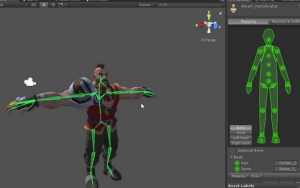
Unity is a powerful and widely used game development engine known for its flexibility, ease of use, and support for both 2D and 3D game development. It provides a comprehensive set of tools for designing, coding, and deploying games across multiple platforms, including PC, mobile, consoles, and web. At its core, Unity uses C# for scripting, allowing developers to control game logic, player interactions, and system behavior. The Unity Editor offers a user-friendly interface for asset management, scene building, and real-time previews. Key fundamentals include understanding game objects, components, scenes, prefabs, and physics. Unity’s modular approach, along with its vast asset store and active developer community, makes it an ideal starting point for beginners and a reliable choice for professional studios alike.
Unity is a powerful and widely used game development engine known for its flexibility, ease of use, and support for both 2D and 3D game development. It provides a comprehensive set of tools for designing, coding, and deploying games across multiple platforms, including PC, mobile, consoles, and web. At its core, Unity uses C# for scripting, allowing developers to control game logic, player interactions, and system behavior. The Unity Editor offers a user-friendly interface for asset management, scene building, and real-time previews. Key fundamentals include understanding game objects, components, scenes, prefabs, and physics. Unity’s modular approach, along with its vast asset store and active developer community, makes it an ideal starting point for beginners and a reliable choice for professional studios alike.
-
-
1. Introduction to Unity Interface
– Overview of Unity Editor panels (Scene, Game, Hierarchy, Inspector, Project).
2. Game Objects and Components
– Understanding GameObjects, Transform, and the component-based architecture.
3. Scenes and Prefabs
– Scene management, creating reusable Prefabs, and working with multiple scenes.
4. Scripting in C#
– Writing and attaching C# scripts to objects, basic syntax, and MonoBehaviour methods.
5. Input Handling
– Capturing keyboard, mouse, and touch input for player interaction.
6. Physics and Collisions
– Rigidbody, Colliders, triggers, and physics-based interactions.
7. UI Development
– Building user interfaces using Canvas, Text, Buttons, and event systems.
8. Animation Basics
– Animator Controller, keyframing, blend trees, and integrating animations into gameplay.
9. Audio Integration
– Adding background music, sound effects, and using Audio Sources and Listeners.
10. Lighting and Materials
– Using different types of lights, materials, shaders, and post-processing effects.
11. Camera Controls
– Static and dynamic cameras, following objects, and camera switching.
12. Building and Deployment
– Exporting games for PC, Android, iOS, WebGL, and other platforms.
13. Asset Management
– Importing and organizing 2D/3D assets, textures, and packages.
14. Debugging and Optimization
– Using the Console, Profiler, and best practices for performance.
15. Unity Asset Store and Package Manager
– Exploring third-party assets and using Unity’s built-in packages.
-
What is Unity used for?
Unity is a cross-platform game engine used to create 2D and 3D video games, simulations, and interactive experiences for platforms like PC, mobile, consoles, VR/AR, and the web.
Is Unity free to use?
Yes, Unity offers a free Personal plan for individuals and small businesses. Paid plans are available with advanced features for larger teams and organizations.
Kerala
Thiruvalla, Pandalam, Adoor, Pathanamthitta, Kayamkulam, Kottayam, Marthandam, Neyyattinkkara, Nedumangad, Thiruvananthapuram City, Kilimanoor, Karikode, Kollam City, Karunagapally, Punalur, Anchal, Kuttikkanam, Elappara, Kalamassery, Kaloor, Angamali, Thrissur, Palakkad, Manjeri, Valanchery, Perinthalmanna, Calicut (Kozhikode), Perumbavoor, Vyttilla, Alappuzha, Harippad.
Tamil Nadu
Velachery, Anna Nagar, Thiruvattiyoor, Neyveli, Aranthangi, Pudukottai, Nagapattinam, Karaikal, Ariyalur, Mulumichampatti, Saravanampatti, Gandhipuram, Kumbakonam, Mayiladuthurai, Vaniyambadi, Vellore, Tirupattur (Vellore), Kancheepuram, Thiruvannamalai, Hosur, Hosur East.
Karnataka
Bangalore Electronic City, Mysore Kuvempunagar, Mysore City.
Andhra Pradesh
Panruti, Dilsukhnagar, Chittoor, West Godavari.
Maharashtra
Panvel, Dombivli, Dombivli East, Thane, Kalyan, Akurdi, Chinchwad, Nigdi, Karvenagar, Revet, Kothrud.
West Bengal
Kolkata, Durgapur.
Rajasthan
Sikar, Kota, Jhalawar.
Jharkhand
Ranchi.
Uttar Pradesh
Allahabad, Lucknow, Rambagh.
Unity is a powerful and widely used game development engine known for its flexibility, ease of use, and support for both 2D and 3D game development. It provides a comprehensive set of tools for designing, coding, and deploying games across multiple platforms, including PC, mobile, consoles, and web. At its core, Unity uses C# for scripting, allowing developers to control game logic, player interactions, and system behavior. The Unity Editor offers a user-friendly interface for asset management, scene building, and real-time previews. Key fundamentals include understanding game objects, components, scenes, prefabs, and physics. Unity’s modular approach, along with its vast asset store and active developer community, makes it an ideal starting point for beginners and a reliable choice for professional studios alike.
-
-
1. Introduction to Unity Interface
– Overview of Unity Editor panels (Scene, Game, Hierarchy, Inspector, Project).
2. Game Objects and Components
– Understanding GameObjects, Transform, and the component-based architecture.
3. Scenes and Prefabs
– Scene management, creating reusable Prefabs, and working with multiple scenes.
4. Scripting in C#
– Writing and attaching C# scripts to objects, basic syntax, and MonoBehaviour methods.
5. Input Handling
– Capturing keyboard, mouse, and touch input for player interaction.
6. Physics and Collisions
– Rigidbody, Colliders, triggers, and physics-based interactions.
7. UI Development
– Building user interfaces using Canvas, Text, Buttons, and event systems.
8. Animation Basics
– Animator Controller, keyframing, blend trees, and integrating animations into gameplay.
9. Audio Integration
– Adding background music, sound effects, and using Audio Sources and Listeners.
10. Lighting and Materials
– Using different types of lights, materials, shaders, and post-processing effects.
11. Camera Controls
– Static and dynamic cameras, following objects, and camera switching.
12. Building and Deployment
– Exporting games for PC, Android, iOS, WebGL, and other platforms.
13. Asset Management
– Importing and organizing 2D/3D assets, textures, and packages.
14. Debugging and Optimization
– Using the Console, Profiler, and best practices for performance.
15. Unity Asset Store and Package Manager
– Exploring third-party assets and using Unity’s built-in packages.
-
What is Unity used for?
Unity is a cross-platform game engine used to create 2D and 3D video games, simulations, and interactive experiences for platforms like PC, mobile, consoles, VR/AR, and the web.
Is Unity free to use?
Yes, Unity offers a free Personal plan for individuals and small businesses. Paid plans are available with advanced features for larger teams and organizations.
Unity is a cross-platform game engine used to create 2D and 3D video games, simulations, and interactive experiences for platforms like PC, mobile, consoles, VR/AR, and the web.
Yes, Unity offers a free Personal plan for individuals and small businesses. Paid plans are available with advanced features for larger teams and organizations.
Kerala
Thiruvalla, Pandalam, Adoor, Pathanamthitta, Kayamkulam, Kottayam, Marthandam, Neyyattinkkara, Nedumangad, Thiruvananthapuram City, Kilimanoor, Karikode, Kollam City, Karunagapally, Punalur, Anchal, Kuttikkanam, Elappara, Kalamassery, Kaloor, Angamali, Thrissur, Palakkad, Manjeri, Valanchery, Perinthalmanna, Calicut (Kozhikode), Perumbavoor, Vyttilla, Alappuzha, Harippad.
Tamil Nadu
Velachery, Anna Nagar, Thiruvattiyoor, Neyveli, Aranthangi, Pudukottai, Nagapattinam, Karaikal, Ariyalur, Mulumichampatti, Saravanampatti, Gandhipuram, Kumbakonam, Mayiladuthurai, Vaniyambadi, Vellore, Tirupattur (Vellore), Kancheepuram, Thiruvannamalai, Hosur, Hosur East.
Karnataka
Bangalore Electronic City, Mysore Kuvempunagar, Mysore City.
Andhra Pradesh
Panruti, Dilsukhnagar, Chittoor, West Godavari.
Maharashtra
Panvel, Dombivli, Dombivli East, Thane, Kalyan, Akurdi, Chinchwad, Nigdi, Karvenagar, Revet, Kothrud.
West Bengal
Kolkata, Durgapur.
Rajasthan
Sikar, Kota, Jhalawar.
Jharkhand
Ranchi.
Uttar Pradesh
Allahabad, Lucknow, Rambagh.